
New Features
Shopfront Version Two Preview

Nicholas Clark
It’s nearly here! Shopfront version two will be released to the first store on the 28th of October, 2019. It’s been a long time coming, but we promise it will be well worth the wait.
We started the redesign in January 2018, a year after the first version of Shopfront was released. With it comes a huge array of new features and changes that we can’t wait to show you.
We decided to redesign Shopfront as we had learnt a lot in the first year of our release, we had so many features and improvements we wanted to add and decided it was time to give Shopfront a facelift. Doing so also allowed us to redevelop how a few of our features worked to make it easier to work with.
Now that version two is nearly here, we plan to roll it out quickly to ensure that everyone gets the latest features, after the release to the first store on the 28th of October, we plan on releasing to 10 other beta stores within the next two weeks. After this we will hold the release to ensure there are no major issues we have to deal with. Once a little bit of time has passed (we’re aiming for late November, early December) we will make Shopfront generally available to all vendors. This doesn’t mean we will be forcing it upon all stores just before Christmas, but it does mean that if you want to be using the latest features, they will be available to you.
Once the Christmas period is over, we’ll be looking to move everyone across, with most vendors moving in January 2020. On January 31st 2020, we will be stopping support for version one and on the 24th of February 2020 we will be forcing everyone to move to version two.
If you want to get onto version two as soon as possible, please get in touch with us.
Shopfront version two comes with a huge amount of new features, here’s a sneak peak at five highly-requested features.
Redesigned User Interface
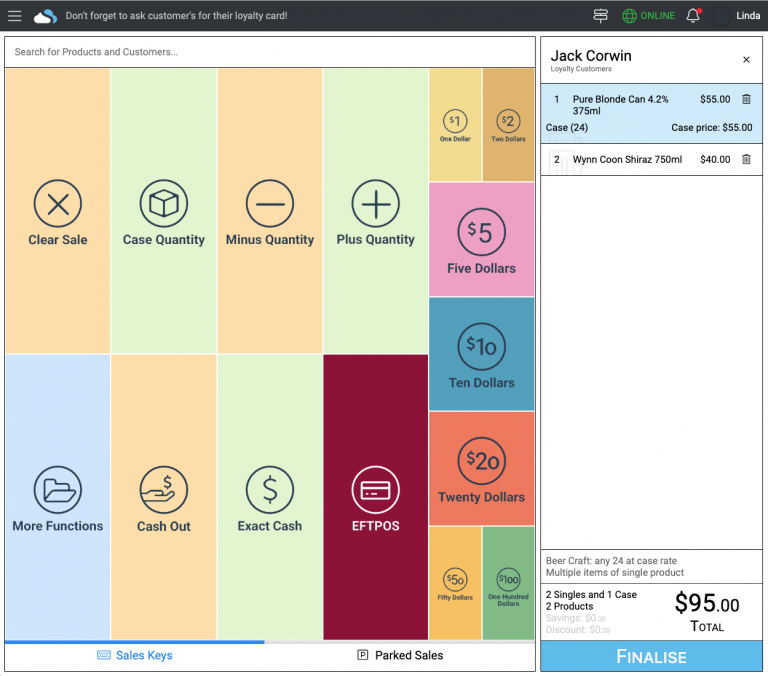
By far the most obvious change in Shopfront version two is the redesigned user interface.
It’s a lot flatter, quicker and just generally better to look at (if we do say so ourselves).
It also comes with a lot of new features just purely in the redesign, the entire POS system is now a single page application (SPA), which means that there is no loading between each page.
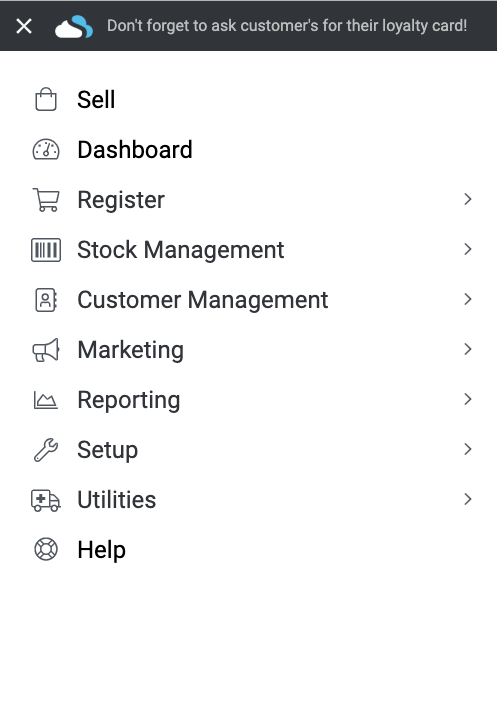
As can be seen on the right, we’ve added a couple of menu groups (utilities and marketing) and we’ve had to rearrange where a few items are in the menu.
Performing orders and receiving invoices is now in the menu as “Orders & Invoices”, promotions, shelf tickets and the media centre have been moved to the new Marketing menu and the Utilities menu has been added which contains the mail log, trashed items and future prices.
New Cash Management
Shopfront version two also comes with new cash management functionality, we’ve split version one’s manage takings into two parts, a close register part and a manage cash part. This allowed us to create better permissions, display cash movement history and add a couple of other features.
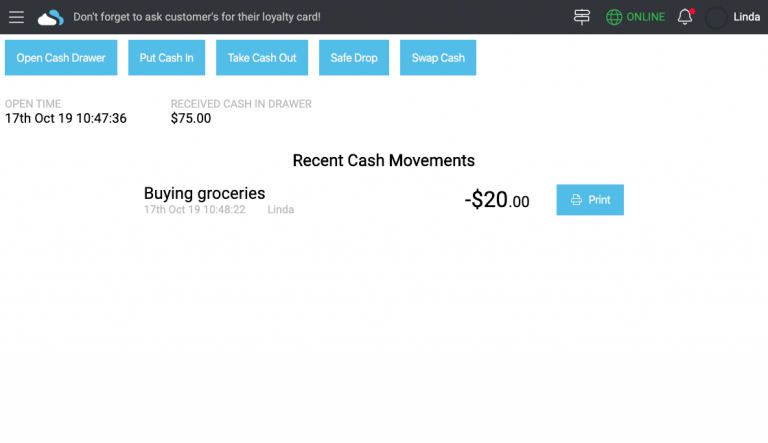
The new manage cash screen displays the register open time, the recent cash movements (which you can reprint) and allows you to put cash into the drawer, remove cash from the drawer and swap cash denominations.
Reworked Customer Accounts
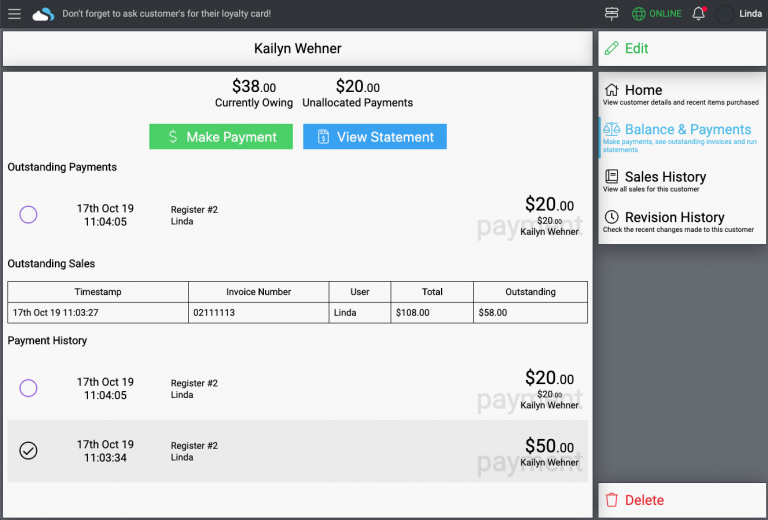
The way you deal with debtor payments and outstanding sales has been completely redeveloped to make it easier to use and provide more options for you to manage your customer accounts.
You can now perform customer payments while you’re offline, create a payment that is unallocated to an invoice, cancel and refund payments as well as being able to provide change for cash customer payments. We’ve also prevented outstanding customer payments from automatically being allocated to the next invoice.
Creation Wizards
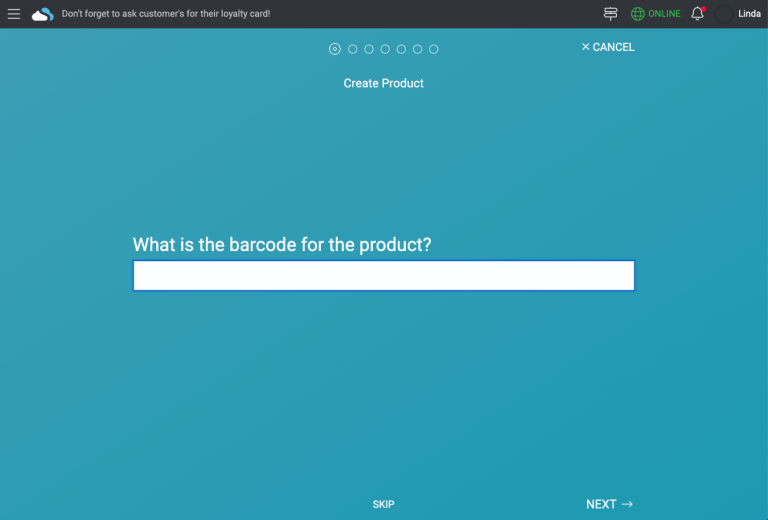
One of the most powerful features coming to Shopfront is the creation wizard, these are available for when you’re creating a product, creating a customer and creating a promotion.
These creation wizards and excessively customisable (you can write your own JavaScript code to program them) and allow you to create products, customers and promotions in your own way.
For example, people can use the customer creation wizard for creating a customer from the register and making sure your staff get the customer’s name, phone number and company or you could make sure your staff get the customer’s name, email address and their pet’s name.
Reporting Query Language
Ever wanted to run a really customised report? Let’s say you wanted to run a report that allowed you to see any products that you’ve sold for less than $100 and are making more than 30% profit on – and show the current inventory as well as the user that sold the product.
In version one of Shopfront this would have involved looking at multiple reports and probably result in you having to take the data into Excel.
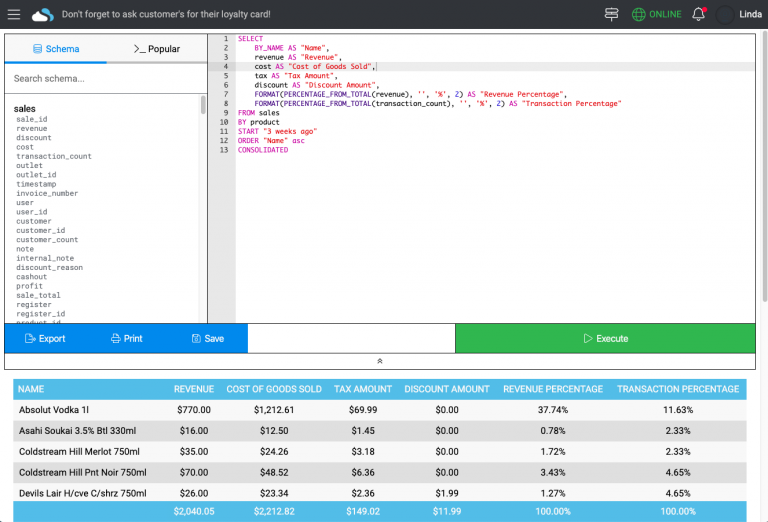
With Shopfront version two, you can now run your own complex reports using our custom built reporting query language. It’s similar to SQL, but provides an easier to use syntax that is designed around our data.
Feature Sneak Peak
But don’t go thinking we’ve only changed these four things, here’s a sneak peak at 55 other changes that are available from day one:
General
New user dashboard screen
Can use markup instead of profit percentage
Can customise the date and time format
Can customise the start of the week
A whole lot of new permissions
Can recover trashed items
Sell Screen
Discounts are now built into the sales transaction rather than through a sales key
Sell rate discount type added
Predefined discount sales key added
Live inventory displayed when searching for products
Can automatically log out after a period of inactivity
WYSIWYG receipt editor
WYSIWYG customer display editor
Can show products as unconsolidated
Payment methods can be assigned to colours
Manage Takings
PC-EFTPOS displays the settlement receipt in close register
Can set the float for each day
Sales History
Sales are no longer paginated, they use infinite loading now
Can view multiple sales at the same time
Can modify payment methods on sales
Product Management
Transfer history now appears in the product view page
Can mark a product as don’t sell or don’t order
Additional information can be bound to types (number, string, boolean, etc)
Orders & Invoices
New “Outstanding” filter added
Added receiving credit notes
Can generate orders from both sales and reorder points
Can exclude stock from being included in generated orders when already on order
Can add an entire classification or supplier to an order
Can verify an invoice total by entering it in before receiving an invoice
Can reset quantities to zero when receiving an invoice
Purchase rebates can be received when inputting an invoice
Can see who created, sent and received an order
Stocktaking
Stocktakes can now be named
Can see who else is currently in a stocktake
External stocktake history is now available
Customer Management
WYSIWYG statement editor
Can customise the email signature for customer statements
Price Lists
Can add all categories to a price list
Price lists can now be set to a higher price than the everyday price
Price lists can now have minimum price rules to ensure prices don’t fall too low
Price points are now longer fixed to the product’s price points
Promotions
Can set the start and end times for a promotion
Natural language edit screen
Media Centre
Items can be deleted
Items can be renamed
More file types are supported
Reporting
Reporting dashboard can compare previous periods
Reporting dashboard can be filtered by outlet
Time zones are correctly handled when swapping between daylight savings
Register Closures
Can be filtered by date, time and outlet
Register closures now use infinite loading rather than pagination
Developers
Version two of the JSON API (GraphQL)
Release of the Embedded Application API
Release of the Payment Method API
Release of the Reporting API
These are just a few of the features we’ve been working on, but there are so many more that we can’t wait to show you.
Developer — Privacy — Terms & Conditions — Copyright © 2026 Shopfront